> ## Documentation Index
> Fetch the complete documentation index at: https://docs.convocore.app/llms.txt
> Use this file to discover all available pages before exploring further.
# Agency Theme
**The design preview interface:**
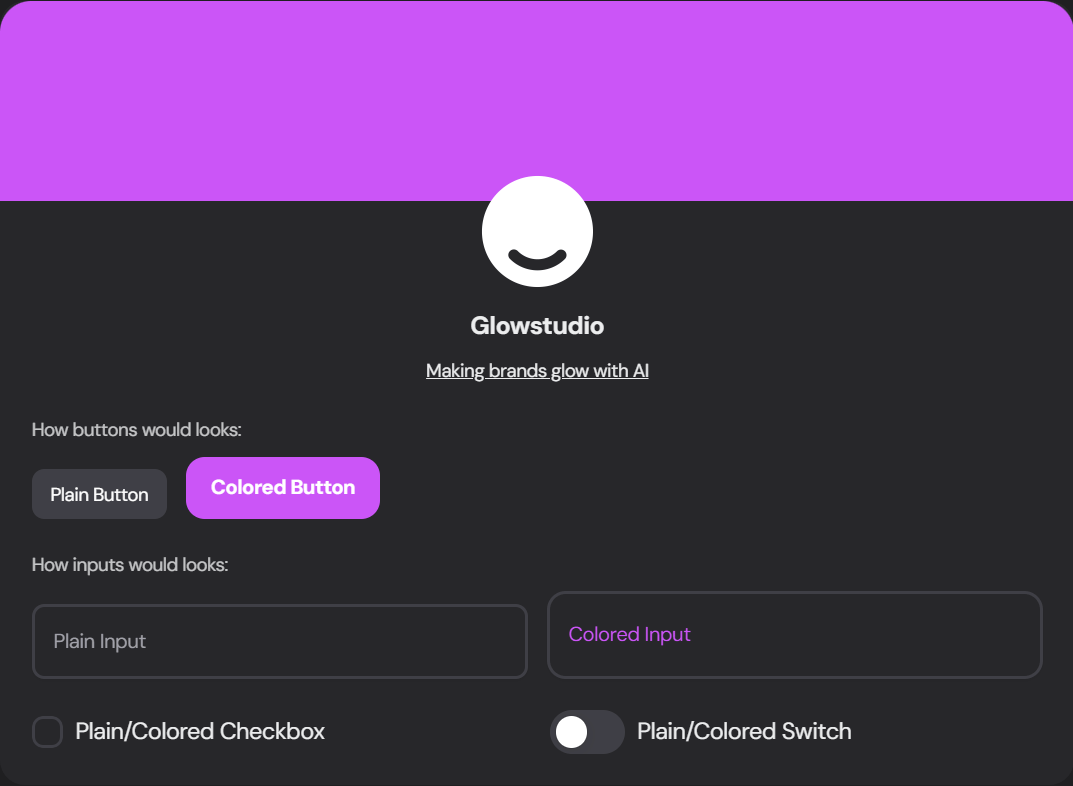 Navigate to the Theme tab in the agency manager to access the following customization features:
### Font Family
Select a font that resonates with your brand from the extensive library of **free** font from [Google Fonts](https://fonts.google.com).
### Color Usage
Choose how extensively you want to use your brand colors throughout the dashboard:
Navigate to the Theme tab in the agency manager to access the following customization features:
### Font Family
Select a font that resonates with your brand from the extensive library of **free** font from [Google Fonts](https://fonts.google.com).
### Color Usage
Choose how extensively you want to use your brand colors throughout the dashboard:
 Simple design with primary color used sparingly
More branded look with increased color usage
Mix of colors with trendy gradient touches
### Theme Variant
Select the overall style of your dashboard elements:
Simple design with primary color used sparingly
More branded look with increased color usage
Mix of colors with trendy gradient touches
### Theme Variant
Select the overall style of your dashboard elements:
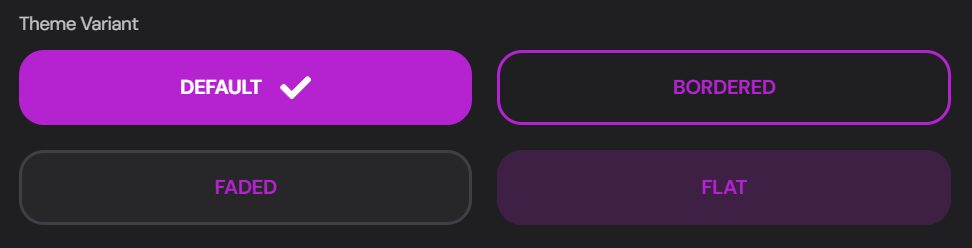 Standard, modern look
Elements with defined borders
Subtle, softer appearance
Minimalist, flat design
### Agency Brand Colors
Define your brand's color palette:
Standard, modern look
Elements with defined borders
Subtle, softer appearance
Minimalist, flat design
### Agency Brand Colors
Define your brand's color palette:
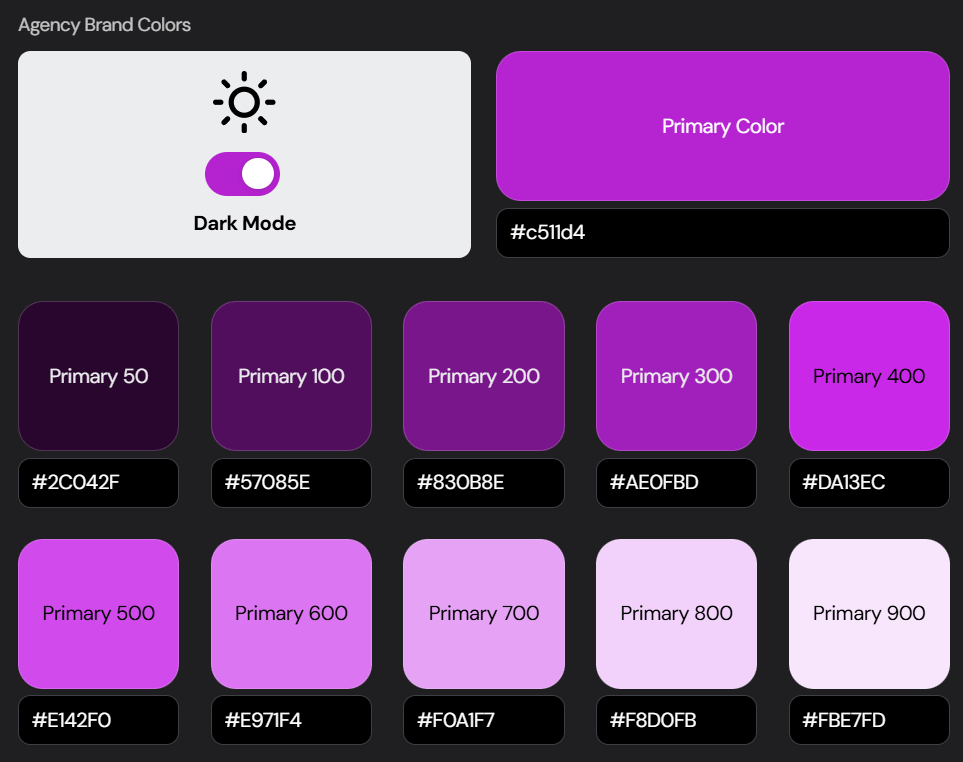 Choose your main brand color using the color picker or enter the HEX code
Fine-tune different shades of your primary color for various UI elements
Enable or disable dark mode for your dashboard
### Client Dashboard Custom CSS
For advanced customization, you can add custom CSS to fine-tune your dashboard's appearance:
Choose your main brand color using the color picker or enter the HEX code
Fine-tune different shades of your primary color for various UI elements
Enable or disable dark mode for your dashboard
### Client Dashboard Custom CSS
For advanced customization, you can add custom CSS to fine-tune your dashboard's appearance:
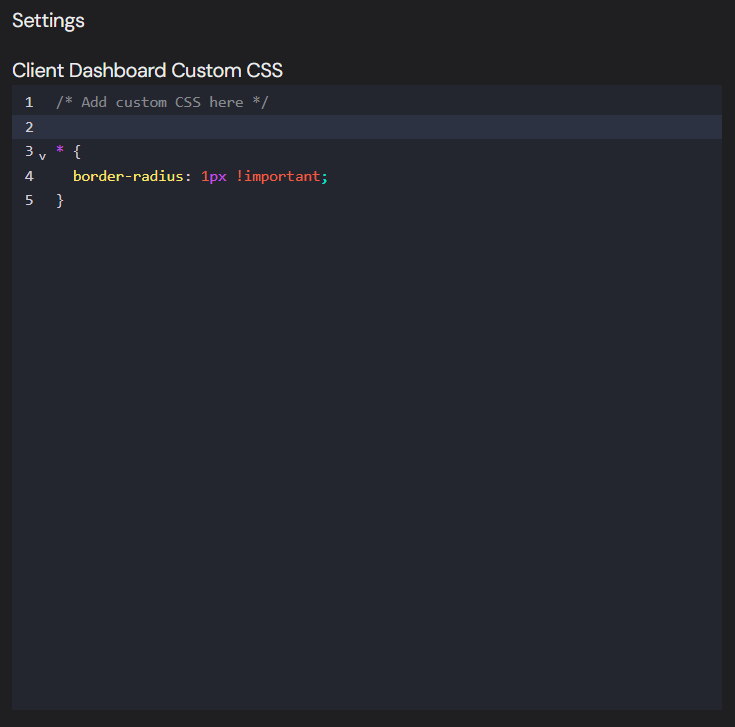 Use **custom CSS** to make precise adjustments to your dashboard's look and feel. Be cautious with your changes to maintain overall design consistency.
Custom CSS is injected under the agency root (`.vg-agency-root-container` / `.vg-agency--root`). Prefer scoping selectors under that root so styles never leak into non-agency surfaces.
### CSS selector map (client dashboard)
Use these stable `vg-*` hooks in Agency → Theme → Client Dashboard Custom CSS. Legacy `vgd-*` hooks still work where present (dual-aliased).
| Area | Example selectors |
| --------------------------------- | --------------------------------------------------------------------------------------------------------------------------------------------- |
| Agency root | `.vg-agency-root-container`, `.vg-agency--root`, `.vg-agency--loading-skeleton` |
| App shell | `.vg-shell--root`, `.vg-shell--topbar`, `.vg-shell--sidebar`, `.vg-shell--content`, `.vg-shell--debugger-pane` |
| Agent shell | `.vg-agent-shell--root`, `.vg-agent-shell--nav-wrap`, `.vg-agent-shell--main`, `.vg-agent-shell--content`, `.vg-agent-shell--debugger-toggle` |
| Agent nav | `.vg-agent-nav--root`, `.vg-agent-nav--button`, `.vg-agent-nav--label`, `.vg-agent-nav--icon`, `.vg-agent-nav--new-agent-button` |
| Usage / trial ribbon | `.vg-usage-ribbon`, `.vg-usage-ribbon--trial`, `.vg-usage-ribbon--pay-button`, `.vg-trial-modal--container` |
| Login | `.vg-login-container--outer`, `.vg-login-container--inner`, `.vg-login-form`, `.vg-login-submit-button`, `.vg-login--lang-switcher` |
| Signup | `.vg-signup-form`, `.vg-signup-submit-button` |
| Forgot / reset password | `.vg-forgot-password--*`, `.vg-reset-password--*` |
| Cookie / blocked / SSO | `.vg-cookie-consent--*`, `.vg-access-blocked--*`, `.vg-sso--*` |
| Onboarding | `.vg-onboarding--page`, `.vg-onboarding-welcome--*`, `.vg-onboarding-goals--*`, … per step |
| Home | `.vg-home--route`, `.vg-home--container`, `.vg-home--try-agent-btn` |
| Convos | `.vg-convos--*`, plus dual `.vgd-*` on the convos layout |
| Billing | `.vg-billing--*` |
| Channels / integrations | `.vg-channels--*`, `.vg-integrations--*`, `.vg-integration-card--*` |
| Analytics / leads / settings / KB | `.vg-analytics--*`, `.vg-leads--*`, `.vg-settings--*`, `.vg-kb--*` |
| Footer | `.vg-agency-footer--container`, `.vg-agency-footer--links` |
Full commented starter stylesheet: [`/sample-dashboard-custom.css`](/sample-dashboard-custom.css) (also useful as a copy/paste base in the Agency CSS editor).
```css Example Custom CSS theme={null}
/* Scope everything to the agency root */
.vg-agency-root-container .vg-login-submit-button {
border-radius: 9999px !important;
}
.vg-agency-root-container .vg-agent-nav--button[data-active="true"],
.vg-agency-root-container .vg-agent-nav--button.bg-primary-50 {
background: yourBrandColor !important;
}
/* Squared corners across the client dashboard */
.vg-agency-root-container * {
border-radius: 1px !important;
}
```
Use **custom CSS** to make precise adjustments to your dashboard's look and feel. Be cautious with your changes to maintain overall design consistency.
Custom CSS is injected under the agency root (`.vg-agency-root-container` / `.vg-agency--root`). Prefer scoping selectors under that root so styles never leak into non-agency surfaces.
### CSS selector map (client dashboard)
Use these stable `vg-*` hooks in Agency → Theme → Client Dashboard Custom CSS. Legacy `vgd-*` hooks still work where present (dual-aliased).
| Area | Example selectors |
| --------------------------------- | --------------------------------------------------------------------------------------------------------------------------------------------- |
| Agency root | `.vg-agency-root-container`, `.vg-agency--root`, `.vg-agency--loading-skeleton` |
| App shell | `.vg-shell--root`, `.vg-shell--topbar`, `.vg-shell--sidebar`, `.vg-shell--content`, `.vg-shell--debugger-pane` |
| Agent shell | `.vg-agent-shell--root`, `.vg-agent-shell--nav-wrap`, `.vg-agent-shell--main`, `.vg-agent-shell--content`, `.vg-agent-shell--debugger-toggle` |
| Agent nav | `.vg-agent-nav--root`, `.vg-agent-nav--button`, `.vg-agent-nav--label`, `.vg-agent-nav--icon`, `.vg-agent-nav--new-agent-button` |
| Usage / trial ribbon | `.vg-usage-ribbon`, `.vg-usage-ribbon--trial`, `.vg-usage-ribbon--pay-button`, `.vg-trial-modal--container` |
| Login | `.vg-login-container--outer`, `.vg-login-container--inner`, `.vg-login-form`, `.vg-login-submit-button`, `.vg-login--lang-switcher` |
| Signup | `.vg-signup-form`, `.vg-signup-submit-button` |
| Forgot / reset password | `.vg-forgot-password--*`, `.vg-reset-password--*` |
| Cookie / blocked / SSO | `.vg-cookie-consent--*`, `.vg-access-blocked--*`, `.vg-sso--*` |
| Onboarding | `.vg-onboarding--page`, `.vg-onboarding-welcome--*`, `.vg-onboarding-goals--*`, … per step |
| Home | `.vg-home--route`, `.vg-home--container`, `.vg-home--try-agent-btn` |
| Convos | `.vg-convos--*`, plus dual `.vgd-*` on the convos layout |
| Billing | `.vg-billing--*` |
| Channels / integrations | `.vg-channels--*`, `.vg-integrations--*`, `.vg-integration-card--*` |
| Analytics / leads / settings / KB | `.vg-analytics--*`, `.vg-leads--*`, `.vg-settings--*`, `.vg-kb--*` |
| Footer | `.vg-agency-footer--container`, `.vg-agency-footer--links` |
Full commented starter stylesheet: [`/sample-dashboard-custom.css`](/sample-dashboard-custom.css) (also useful as a copy/paste base in the Agency CSS editor).
```css Example Custom CSS theme={null}
/* Scope everything to the agency root */
.vg-agency-root-container .vg-login-submit-button {
border-radius: 9999px !important;
}
.vg-agency-root-container .vg-agent-nav--button[data-active="true"],
.vg-agency-root-container .vg-agent-nav--button.bg-primary-50 {
background: yourBrandColor !important;
}
/* Squared corners across the client dashboard */
.vg-agency-root-container * {
border-radius: 1px !important;
}
```